
Wise v8.0.4 release notes
Release Date: June 2026
Introduction
This release of Wise provides a number of new features and enhancements, in addition to numerous bug fixes. These features will help you manage more complex workflows, including:
- Improve relevancy of search results in the OPAC
- Integrate CloudLibrary titles in Grouped search and Available now filter
- Financial activities in the Console
- Claims returned enhancements
- OPAC translation support
Many of these enhancements are the direct result of your feedback.
Watch a video
Wise v8.0.4 release highlights
Run time: 2:12
This brief video highlights the core features and improvements in the Wise v8.0.4 release.
Recommended actions
For this release, we recommend that you review the following checklists and complete the relevant tasks so that you can adjust your policies and workflows and train your staff. These checklists identify updates that we have determined as significant for most institutions. We encourage you to review all of the items in the release notes to determine whether there are other items that might require additional action or follow-up by your institution.
Administrative actions
These items require immediate action or decisions.
| Action |
|---|
|
New features and enhancements
Improved relevancy of search results in the OPAC
Wise search relevancy has been improved so that current demand and recency have a stronger impact on ranking, helping ensure that newer and more popular titles appear higher in results (especially for popular authors and high-demand titles).
What's changed
- Popularity ranking now better reflects current demand by incorporating real-time holds activity (with emphasis on recent holds) rather than relying primarily on historical circulation/ILL signals.
- Publication recency is boosted so that recently published titles are more likely to rise to the top for common searches such as author and title queries.
- Historical circulation / WS ILL influence is de-prioritized (not removed), so older historical demand does not outweigh current interest.
Improved handling for “expected top result” scenarios, including:
- Popular author searches where a new release should rank first
- Single-word title searches where an exact/expected match should surface higher
Boosting logic
- Holds data will boost search results exponentially, based on the number of holds placed on a title. The applied logic will prevent holds from overwhelming other applied boost factors.
- The publication-year boost gives newer titles a higher ranking boost, and fades the boost out as the title gets older
These values can be configured by OCLC. Please share feedback on the performance and let us know if adjustments should be considered.
Integrate CloudLibrary titles in Grouped search and Available now filter
Wise OPAC now integrates CloudLibrary digital titles into the core discovery experience so patrons can find physical and digital formats together in one search flow. This enhancement brings CloudLibrary data into the Wise search index via an ETL pipeline and extends existing grouped-search behavior to include CloudLibrary items.
What's new
- When Grouped Search is enabled, CloudLibrary e-content (eBooks, eAudiobooks, etc.) is grouped alongside physical formats (books, DVDs, CDs, etc.) using the existing FRBR-based grouping mechanism.
- CloudLibrary titles contribute to the Available Now filter using near real-time availability information.
- CloudLibrary data is refreshed into Solr on a regular interval to keep the index in sync.
Configuration
To ensure CloudLibrary e-resources appear in the correct Grouped Search results, the library must update the MDT (Media type) table in Wise Manager to define which media group(s) their e-resource material types should be grouped with (for example, whether an eBook should group with print books, or an eAudiobook with audiobooks). Without this MDT configuration, e-resource records will not group as expected in the OPAC.
OPAC translation support with privacy safeguards
We’ve made updates to better support OPAC translations, including Spanish in OPAC/My Account.
- Joomla libraries: You can add a language-selection dropdown on your site for the languages you want to offer.
- Non‑Joomla libraries: You can use a browser translation add‑on/extension to translate OPAC pages.
To protect patron privacy and prevent confusion, we added no‑translate classes so translation tools won’t translate:
- Personal information (PII)
- Bibliographic data
- Location information
Coming in a future release: We plan to add a built-in language selection tool in the OPAC.
Claims returned (and claim never had) enhancements
Several enhancements to the claim returned process in the Console have expanded staff control of claims limits and streamlined the staff experience.
New configuration added: Time period for counting claims
Staff can set a time limit for how long a claim will count against the patron’s outstanding claim count by adding the value (in months) to the Time period for counting claims (months) field in the Manager. For more information, see Claim returned process.

New item substatus and discard reason for claimed items
A new item substatus, Y, will be assigned to items that have been claimed returned (or claimed never had).
When an item is claimed, the item status will change from U – Checked out to MY: Missing – Claims returned. This change allows the claimed item to no longer appear on the patron’s checked out items list, but still be associated with the patron.
If the time limit for discarding the claimed item has passed, the item will be discarded through an overnight process with a Discard reason of Y – Claims Returned. You can view this new status in the (TABAFR) Discard reasons table in the Wise Manager. For more information, see Items system tables.

New Claims tab in Console patron account:
A new Claims tab is now available in the Activity section of the patron account in Console:

The new tab includes a count of the total unresolved claims made by the patron. If the patron has exceeded the library’s claim limit policy, the color of the count turns yellow to indicate a warning.
When staff claim an item on the patron’s checked-out items screen, the item will move from their checked-out items list into the Claims tab.
Make a claim
There are two ways to make a claim:
On a single item, from the Action button:

- In bulk, by selecting more than one item, or the “check all” checkbox:

Create a claim
The form for making a claim has been streamlined to remove the “checked out branch” field.

Claim limit warning message
A new warning message alerts the staff member to the library’s claim limit policy and turns into a warning if the patron has exceeded the total number of claims.

Claims screen
After a claim is made, the claim appears on the patron’s Claims screen:

The claim will remain on the claim screen until the library’s configured “time period for counting claims” has passed.
If a claimed item is recovered, it will automatically change from “unrecovered” status to “recovered” status at check-in.
Financial activities in the Console - replacement costs
Console updates
- Staff can add a replacement cost to a lost or damaged item checked out to a customer
- Staff receive the option to print a replacement cost invoice for the customer
In the customer’s Activity tab, staff can view the items checked out to the customer. Selecting Actions > Replacement costs will allow staff to add the replacement cost to the item.

Staff can add the cost of the item, associated fines, and a billing note. The options to waive a fine and print an invoice are also available.
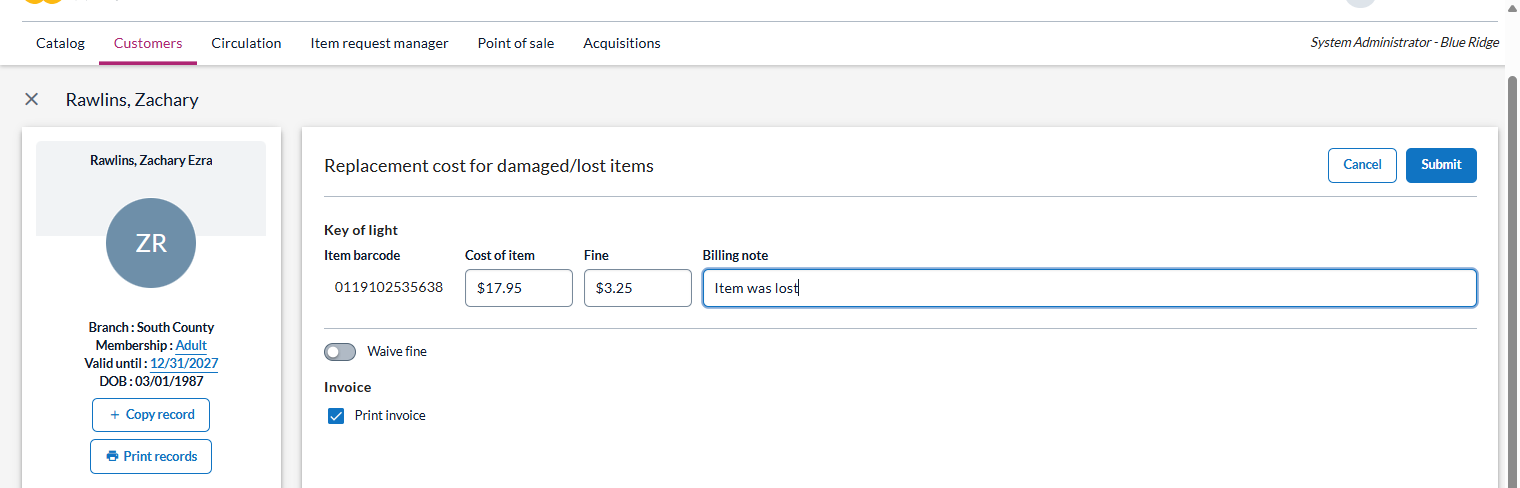
Click Cancel to remove the transaction. Click Submit to save the transaction.
Upon submitting the claim, a bill is generated on a new browser tab and can be printed for the patron.
Note: In this release, it is only possible to generate a replacement cost bill for one item at a time in the Console. The ability to select and bill for multiple items at once will be added in a future release.
Financial activities in the Console - add fines
Staff may add fines to a customer’s account in the Console by accessing Customers > Activity > Financial tab.

Fine details can include:
- Date
- Description
- Amount
- Title (optional)

After clicking on Submit, the new fine will appear in Charges:

Charges may be paid or waived, and the date may be adjusted by selecting Actions for the line item.

Bug fixes and minor enhancements
Client
- When an item is checked in from the hold shelf, if the user clicks X to close the retain/remove hold dialog box, the hold is now retained by default.
- When an item is marked missing, Wise checks for other editions of the same title.
- No notification displays: There are still copies available in other editions.
- Notification displays: There are no copies left anywhere in the system—not in this edition or any other edition.
- In the Client, on the Customer and Circulation screens, you can click on the actor_id to copy it to the clipboard.
- The Account changes log for a customer account now displays the branch where a membership has been changed.
- When viewing a customer’s checked out items in the client, double-clicking on an item line opens the item details screen.
- In Statistics and Selections, you can now include Customer badge in selections, from the Customer – Membership details category. Badge details can be included in customer selections exports.
- Permissions to edit a title have been adjusted to Title maintenance 1-1-0. If a user does not meet the minimal permission, the menu is grayed out.
- When customers enable Show if previously borrowed, Wise groups items with the same FRBR code and alerts customers if they’ve borrowed that title before, even in a different edition or format.
- A filter has been added to the Shelf management screen (Branch management > Shelf management). Use the filter box to search within Code, Desc. staff, and Desc. Public.
- Opening hours can be configured to indicate when a location is staffed or unstaffed. When adding or editing opening hours via Branch management > Opening hours, a drop-down list allows users to indicate whether a location is staffed or unstaffed during specific time blocks.
Manager
- The header URI configuration has moved from Management organizations > Library organizations to SystemWise > Wisecat+ configuration.
- In the Manager, systemWise > Dashboard > Dashboard, on the Reports tab, the filter functionality has been expanded to include the ability to search by report name.
OPAC
- Users can log into the OPAC directly with a new parameter: ?directLogin=true.
- Example: <domainname>/wise-apps/opac/branch/<branch number>/my-account/checkouts/physical-materials?directLogin=true
- Users with outstanding fines are no longer blocked from using the Community features.
- Community list issues have been resolved, titles can be added to a list and links from the community feed point to the correct title record.
- New Arrivals list now displays titles acquired in the past 3 months instead of the past year. The page also updates in sync with the title updater so that newly added titles appear on the page as soon as they are added to the collection.
Console
- On the Unprocessed holds screen, Wise no longer shows a “0” value when no value is stored in the Position, Hold condition or Group number columns.
- Holds validation and messaging in the Console aligns with the Client.
- The SMS number is no longer a required field when editing a customer record.
System maintenance
- All applications have been upgraded from Spring version 6.2 to version 7.
Known issues
Claims allowed for items checked out at other Library Organizations
The claims returned feature should not allow claims to be made if the item was checked out from a branch in a different LO than the staff member’s logged – in Library Organization (LO).
However, when making claims, staff are able to claim items checked-out from other LOs.
Impact:
- Libraries in a consortium may claim items that shouldn’t be claimed at their location.
- The item will go into claimed status properly, and the claim will appear on the Missing Items report.
- The patron’s claim count will increase and reflect the correct number of total claims, but the claim will not be visible in the patron’s Claims screen:

Outstanding claim count does not decrease when a claim is resolved
The count of outstanding claims should decrease if a claim is resolved, but currently, the number remains the same.
Impact: Staff may incorrectly assume that the patron’s claim limit has been exceeded.
Claim column on missing item report is not properly checked when a claimed item is on the report

Impact: Staff will not be able to use the Missing items list to search specifically for claimed items.
Replacement costs are not pre-populated
When generating a replacement cost bill, the amount is not pre-populated. Until this is resolved, the workaround is to enter the replacement cost price into the replacement cost screen before generating the bill.
Important links
Support website(s)
Support information for this product and related products can be found at: